


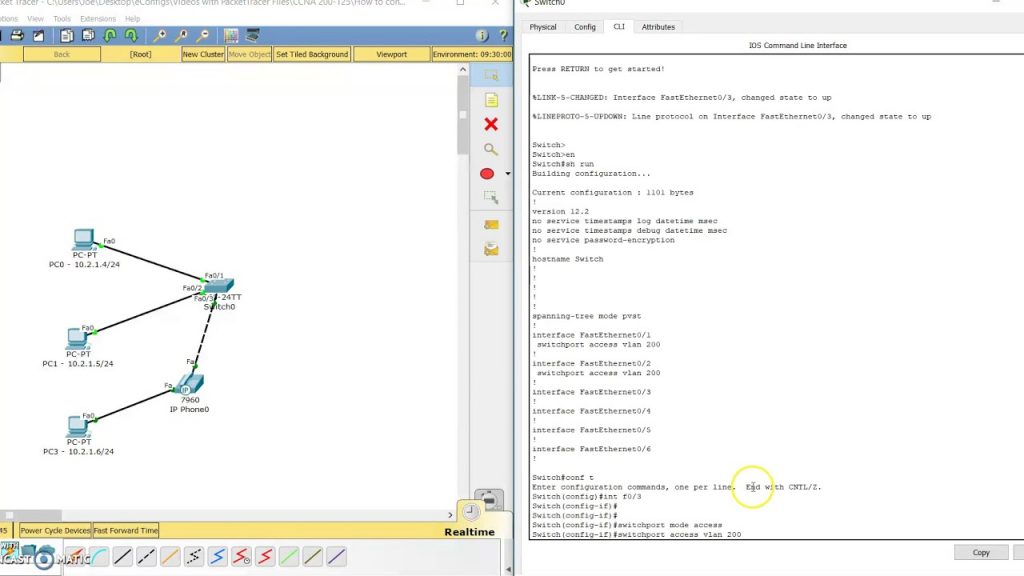
Overview:
How to configure an access port for data and voice
Study Notes:
- A data and voice access port is required when you have a computer connected to a VoIP phone at a desk
- The switchport is configured with a voice vlan and a data vlan
- This is called a Multi-VLAN Access Port (MVAP)
- The VoIP phone has two different ports in the back and acts as a switch
- The PC port is for the computer and it uses the access vlan configured on the switchport
- The switch port on the back of the VoIP phone connects to the switch
- The VoIP phone will use the voice vlan configured on the switch
THIS LAB FREE!
PacketTracer Lab: CCNA-2.4.a-How-to-configure-an-access-port-for-data-and-voice.pkt
Connect PC3 to the PC port on the IP Phone using a straight-through cable
Connect the switchport on the IP Phone to f0/3 on the switch using a crossover cable
Configure the switch
show run
config t
    int f0/3
        switchport mode access
        switchport access vlan 200
        switchport voice vlan 250
        Ctrl+Z
show run
On PC0, open a command prompt
ping 10.2.1.6
Reply from 10.2.1.6 bytes=32 time=1ms ttl=128
Reply from 10.2.1.6 bytes=32 time=1ms ttl=128
Reply from 10.2.1.6 bytes=32 time=1ms ttl=128
Reply from 10.2.1.6 bytes=32 time=1ms ttl=128
Video:
